
How to Write SEO Blog Posts That Rank on Google in 2026

Most blog posts get no traffic at all. Not even ten visits a month. Zero. Those posts are just sitting there, gathering digital dust, while a handful of pages on competing sites are drawing a whole lot of clicks. The difference between these two results often comes down to one thing: how the post was prepared before it was published. Learning to write SEO blog posts that rank isn’t about fooling Google. It’s about understanding what searchers are really looking for, delivering it better than anyone else, and presenting it in a way that Google can easily trust and rank. These three things- right intent, depth of content, and technical clarity are what will get your post to page one. This guide will walk you through the entire process, step by step, from start to finish. Whether you’ve never written an SEO post before or you’ve been writing for years but are wondering why your rankings aren’t going up, here are some things that will change the way you look at your own and other posts.

An SEO blog post is content intentionally crafted to satisfy a specific search query, align with reader intent, and meet Google's quality signals, allowing the post to organically rank well and drive consistent traffic over time.

The core process looks like this:

  1. Identify keywords with real search volume and achievable competition.
  2. Understand the purpose behind that keyword.
  3. Look at what the top-ranking content covers and identify where there are gaps.
  4. Then write more accurate, more useful, or more complete content.
  5. Optimise on-page elements (titles, headings, meta, internal links).
  6. Build credibility by using sources that appear to be expert and trustworthy.
  7. Finally, publish, get indexed, and monitor results.

Sounds easy to hear, but it takes skill to do well. Now let’s dive deeper.

Step 1: Start With Keyword Research That Actually Informs Your Writing
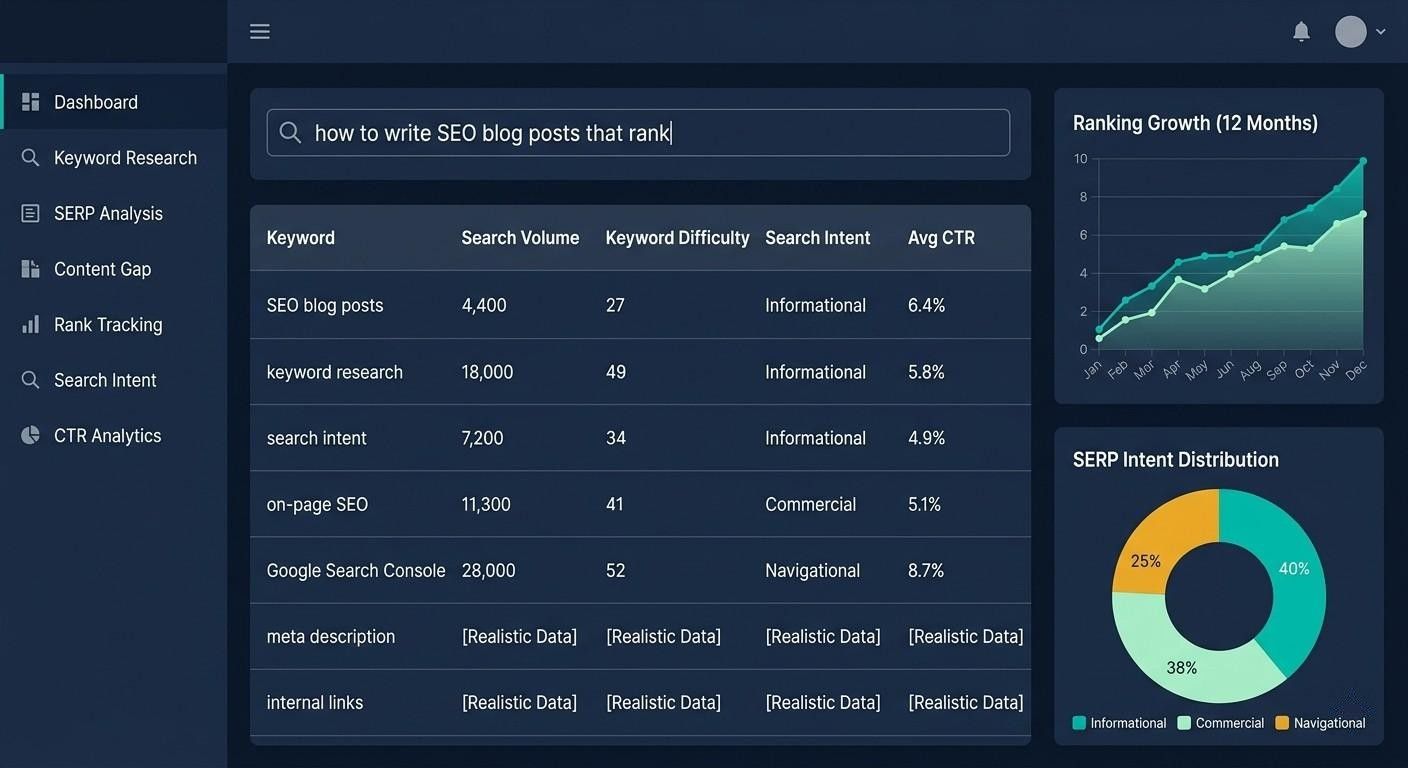
Keyword research isn’t a checkbox you can tick before writing. It’s the foundation that guides every decision you make about your post.

Find the Right Keyword

Use Ahrefs, Semrush, or free options like Google’s Auto-complete and “People Also Ask” box, as well as Google Search Console. You’ll want keywords that:

  • Sufficient search volume to follow (500+ searches per month is usually good for new sites, but 100–200 can be fine for many niche topics)
  • Relevant intent: looking for information, considering buying, buying directly, or searching for a specific site
  • And there should be potential competition based on the level of your domain

Expert Tip: Don’t chase keywords with huge search volume; start choosing keywords that you can win. A keyword with around 800 searches per month and low competition can drive more traffic to a new blog than a keyword with 50,000 searches that Forbes, HubSpot, and Wikipedia are full of.

Understand What the Searcher Actually Wants

Type your keyword into Google and look carefully at the top five results. Then ask yourself:

  • Are they lists, tutorials, product pages, or comparison articles?
  • Do they cover the surface or go into deep technical detail?
  • What questions appear in the “People Also Ask” box?

real-world example, if you target the keyword “how to start a podcast,” the results above are almost all step-by-step guides, covering at least 8-10 steps, including gear recommendations and platform comparisons. If you instead write a generic 600-word overview, you won’t rank no matter how good your on-page SEO is. Ultimately, purpose wins out.

Step 2: Plan Your Structure Before You Write a Single Word

Experienced writers plan before they write. This is not an option in SEO blog writing. This is what makes the difference between a post that ranks and a piece of content that Google ignores, just full of words.

Build Your Outline From SERPs, Not Assumptions

After you’ve done your keyword research, open up the top 3 to 5 ranking posts. Pay close attention to the headings they use. Then ask yourself: What did they leave out? What did they make too simple? That gap is where your opportunity lies.

Your outline should include:

  • H1 containing your main keyword, written in a way that attracts people to click
  • Introduction connecting the reader, giving them a clear indication of what they are going to learn
  • H2 sections containing 4 to 6 main ideas that capture what the searcher is looking for
  • H3, used only when there are truly distinct subtopics within a single H2 
  • FAQ section targeting “People Also Ask” and long-tail questions
  • Conclusion with a CTA sums up the depth and guides you to the next step

Word Count Is a Clue, Not a Target

A lot of SEO advice says “write 2,500 words to rank.” But that misses the point.

Write only as much as the topic really requires. Look at the average word count of the top posts for your keyword, but don’t take that as a hard rule, just a general guideline.

A clear and useful 1,200-word article can easily outperform an unnecessarily long 3,000-word article in most cases.

Expert Tip: Use Ahrefs or Semrush’s “Content Gap” feature to find keywords that your competitors aren’t ranking for. These keywords can often become H2 or H3 sections that you didn’t even think to include in the first place.

 Step 3: Write Content That Demonstrates Real Expertise

Google’s helpful content guidelines and E-E-A-T (Experience, Expertise, Authority, Trustworthiness) give more weight to content that feels like it came from someone who actually did the work. These systems don’t value superficial or generic content. 

Write From Experience: Real or Researched

If you’ve used a tool yourself, run a campaign, experienced mistakes, or achieved results, be open about it. First-person experiences make content more vivid and believable.

If you haven’t personally done it, do some in-depth research instead. Interview people who have worked in the field, use real case studies, or cite verified sources.

Content based on concrete details and real examples is more effective than writing generalities.

Real Example: Simply writing “email marketing has a high ROI” is a cliché. But saying “According to Litmus’ 2023 State of Email Report, email marketing returns an average of $36 for every $1 spent. That’s more than social media and paid search combined” is actually useful. The first sentence is just noise; the second is fact-based and useful information.

Use the “So What” Test

After each paragraph, ask yourself, “What next?”

If you can’t answer that question clearly for the reader in one sentence, remove or rewrite the paragraph.

Each paragraph should earn its place.

Mix Sentence Length and Vary Rhythm

Long sentences build context. Short sentences provide a foundation. Both are equally important. Monotonous sentence structure bores readers, and the habit of leaving the page too early sends a negative signal to Google.

Expert tip: Read your draft out loud before publishing. If you get stuck while reading, the sentences are too long. If everything sounds the same and vague, add more variety to the sentences. Your ears will easily pick up on what your eyes missed.

Step 4: Optimise On-Page SEO Without Over-Optimising

On-page SEO for a blog post isn't about stuffing keywords into every paragraph. It's about putting the right signals in the places Google will notice, while keeping the content natural for the reader.

The On-Page Checklist

The title tag (H1) should contain your main keyword.

It’s best to keep it under 60 characters, so that it doesn’t get truncated in search results.

And the title should be something that people want to click on. Not just to include keywords.

Meta Description

It’s best to keep the meta description around 150–160 characters.

The primary keyword should be included naturally.

And it should directly answer the question “Why should I click on this result?”

The URL 

Slug should be short and word-rich, avoiding unnecessary words as much as possible. For example: It is better to use /seo-blog-post-guide, rather than /how-to-write-an-seo-blog-post-that-ranks-on-google.

Headings should be organised as follows:

H1 should contain the main keyword.

At least one H2 should also naturally contain the main keyword or a close variation of it.

H3 can be used for subtopics. It is not necessary to force the keyword here.

In the main content:

The primary keyword should occur naturally within the first 100 words.

Related (LSI) keywords should be spread naturally throughout the content. There is no need to put two or three in the same sentence.

Do not stuff keywords under any circumstances; if it looks strange when read, remove it immediately.

For images:

Write descriptive alt text that provides context. Don’t just include keywords.

Compress images to load faster (tools like Squoosh or ShortPixel can help).

Also keep the file name relevant, screenshot-sized, meaningful, and clear.

Internal links:

Link to 2 to 4 related posts on your site.

Make anchor text clear and descriptive. Avoid using words like “click here.”

This deepens authority well within the site and makes it easier for Google to understand the structure of your site.

Expert Tip: Put your primary keyword in the first sentence of your meta description, not hidden in the well-optimised.Bolds matching words in search results, which increases the likelihood of a click.

The One On-Page Element Most Writers Ignore

Schema markup adds structure to your blog posts, which helps Google better understand your content.

Adding the Article or HowTo schema can result in rich results like FAQ dropdowns, star ratings, or step-by- step guides right in the search results. Certain Rank Math plugins make this easy without touching any code.

Step 5: Build Content Depth With Supporting Elements

Posts that rank well over time aren’t just screenshot-sized. They’re actually the most useful on the topic. This means not just listing simple tips, but creating content that has layers of depth.

Elements That Add Depth Without Adding Fluff

Use original examples. Connect each main point to a real situation, or give a fictional example that makes it seem real. A general summary will not last long.

Only use statistics and data when you are absolutely certain that they are accurate and up-to-date. Ten correct statistics can build trust, but one incorrect statistic can quickly destroy that trust.

Visuals. Screenshots, diagrams, and charts help reduce bounce rates and increase time on page. A well-placed screenshot in a tutorial can convey more than three paragraphs.

Comparison tables.When your post compares multiple options, a table makes it easier to make a decision and establishes your post as a reliable source.

Expert quotes or perspectives .Citing the proven opinion of a well-known expert and explaining it also adds credibility. But you should clearly show that you are referring to an established point of view, not something you have made up yourself.

Real Example: Case study formats like “What happened when we changed our H1 from ‘SEO tips’ to ‘how to write SEO blog posts that rank’” perform much better than simple advice. This type of content improves every engagement metric. Readers can clearly see the difference before and after, so they’re more likely to remember and share.

Expert Tip: Put a “Last updated” date above your updated posts. Google also takes freshness into account in many informational searches, and readers trust content that is updated regularly.

Step 6: Publish, Index, and Track Performance
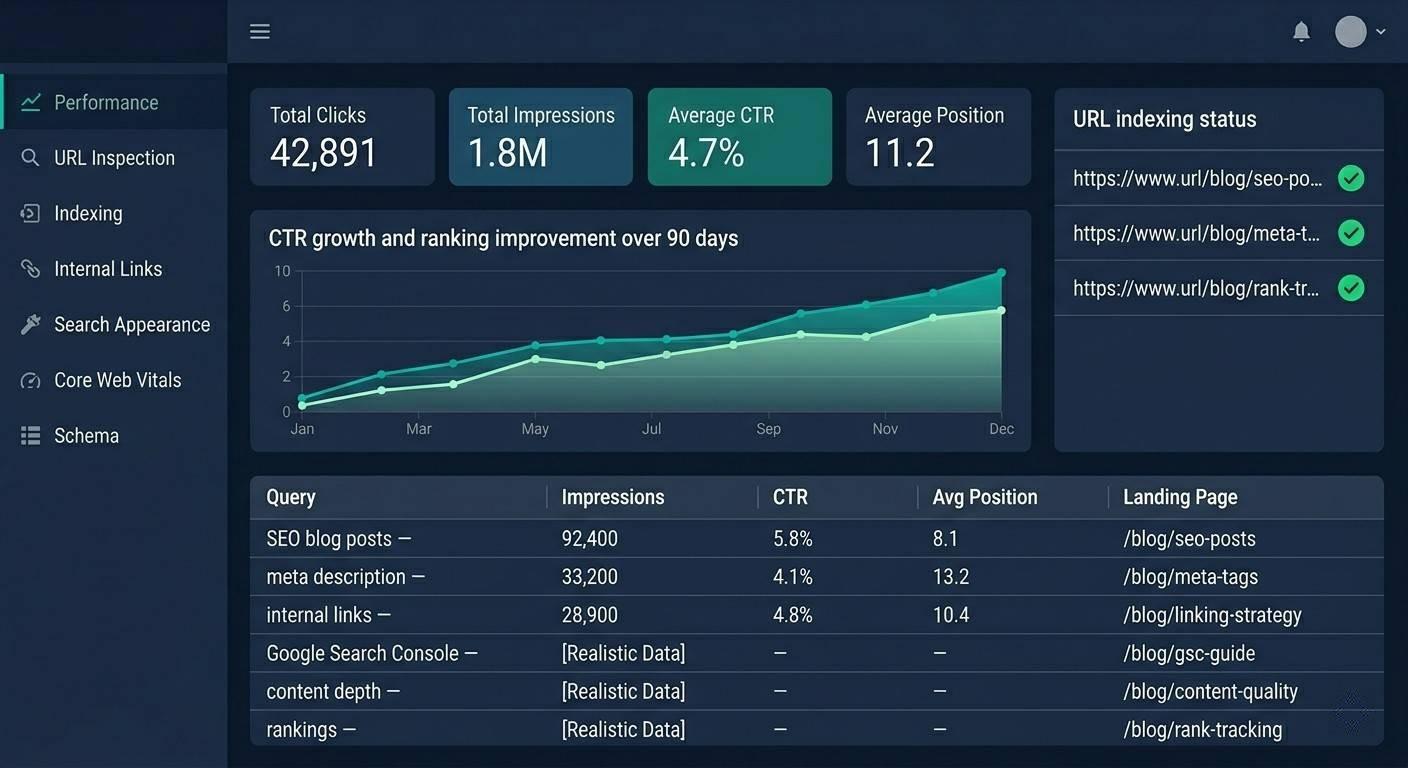
Writing a post is only half the battle. The real difference comes after that. What you do after publishing is what determines whether your efforts grow or stagnate over time.

Get Indexed Fast

After publishing, go to Google Search Console and submit your URL directly via URL Inspection → Request Indexing. Google will usually start crawling it within 24–48 hours.

Build Internal Links to New Posts

Add relevant internal links to the new post, pointing back to 3-5 related posts on your site. This helps pass authority and makes it easier for Google to quickly find the new URL through its crawl path.

Monitor With Search Console

Check these things within 30 days of publishing:

  • Impressions: Are you starting to show up for your target keywords?
  • Average Position: Are you in the top 50 or top 20?
  • Click-through Rate (CTR): If impressions are deep but CTR is low, your title or meta description may need to be improved.

Rank tracking tools like Ahrefs or Semrush provide more detailed data, but Google Search Console is free and in most cases sufficient for initial tracking.

Refresh Before You Abandon

If a post has been stuck in the 8-20 spot for two to three months, it means it’s getting close. But it’s not quite there yet. In such cases, update the post. Add a new section that your competitors don’t have. Strengthen the introduction. Refresh old statistics. In many cases, such targeted updates can get a new post into the top five faster than writing it from scratch.


Expert Tip: Set a calendar reminder to audit your top 10 posts every six months. Rankings can slowly decline over time. A post that was #2 last year could fall to #11 without you doing anything. In many cases, a single, accurate update that takes just an hour can bring back months of lost traffic.

Conclusion: Write Posts Worth Ranking

Every blog post that ranks does a few basic things well: targets the right keywords, matches the searcher’s intent, provides real, useful information, and presents everything in a way that’s easy to read and Google can understand. These tasks aren’t complicated, but they do require discipline to do consistently. Writers who consistently rank aren’t always the most talented. They’re more organized.
They research before they write, plan before they draft, and optimize without adding unnecessary complexity. Then they watch the results, update, and improve. Start with one post. Apply the steps in this guide to it. Publish, submit to Google Search Console, and give it 60 days. What you learn from that one post will become the foundation for making each subsequent post better.

FAQ: Writing SEO Blog Posts That Rank

How long should an SEO blog post be to rank on Google?

There is no one-size-fits-all answer. You should aim for at least as much depth as the top posts for your targeted keywords. Informational tutorials often perform well at 1,500–3,000 words, while smaller or more limited topics can rank well at 800 words. Adding unnecessary content just to increase word count can do more harm than good.

How many keywords should I use in a blog post?

Focus on one main keyword in each post, and naturally use five to fifteen semantically related words (LSI keywords) that support it. The old way of chasing keyword density is no longer effective. Write with the reader in mind — if you cover the topic well, the necessary keywords will naturally appear on their own.

How long does it take for a blog post to rank on Google?

For new or low-authority sites, it can typically take 3 to 6 months to see meaningful rankings.

However, sites with already established authority can rank new content within a few days to a few weeks.

Patience and consistently publishing content are the key to seeing results over time.

Does blog post formatting affect SEO rankings?

Yes. Indirectly but very effectively. Clear headings, short paragraphs, and good structure improve user experience, reduce bounce rates, and increase time spent on page. All of these engagement signals affect rankings. Good structure can also make content eligible for featured snippets.

Can I rank a blog post without backlinks?

Yes, especially for long-tail keywords with low competition. Good on-page optimization, clear search intent match, and genuine quality content can rank without external links in most cases. But for competitive keywords, backlinks are still an important ranking factor. However, they are not the only determining factor.

Leave a Comment

Your email address will not be published. Required fields are marked *

Scroll to Top